Where do you find your invoices for Facebook ads?
Some jobs that look simple on paper, and that anyone running Facebook Ads has to do, turn out to eat a lot of time in practice. The problem can be finding the data and the files you actually want. One thing business owners regularly get stuck on is how to download an invoice from Facebook. Where do you find it? See also: Running Facebook Ads campaigns. Before you pick a payment method, check your ad account settings first — add your company details.

In this post
See also: Running Facebook Ads campaigns
- Before you pick a payment method, check your ad account settings first — add your company details. Facebook needs them to be able to issue an invoice.
- Facebook generally issues invoices automatically, once the payments land on the account.
- You can download the documents after logging in to the ad account — individual invoices are available for the whole life of that account.
How do you download invoices from Facebook?
Luckily, the job is easier than you might think. Click here: https://www.facebook.com/ads/manager/billing/transactions/ and log in to your account. You'll get a view much like the one below. As you can see, there are no invoices here at all, and that comes down to the date range set for the transactions on display.
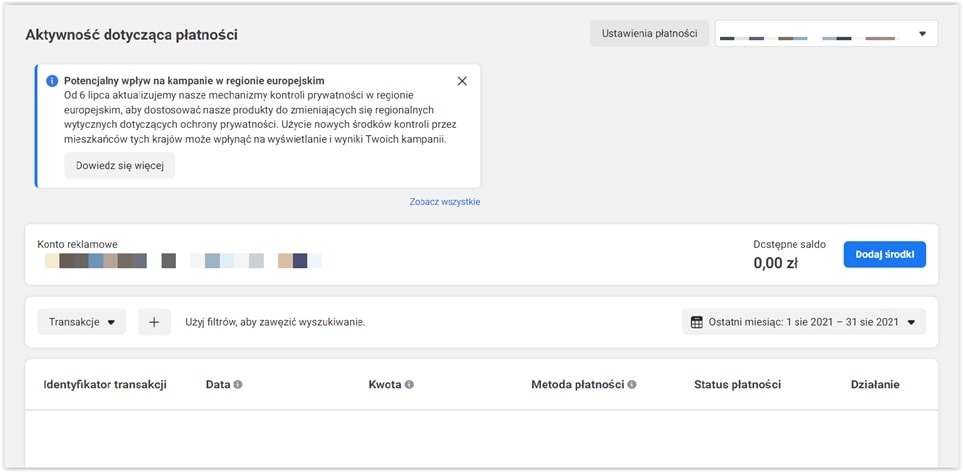
So change the range to the one you want. One of the options is “Lifetime.” That will show you every transaction made on the ad account since the day it was set up. The invoices for that period are in there.

On the right there is an “Action” column — that is where you can download individual invoices as PDFs. Your company details may not appear on them, as in the case below:
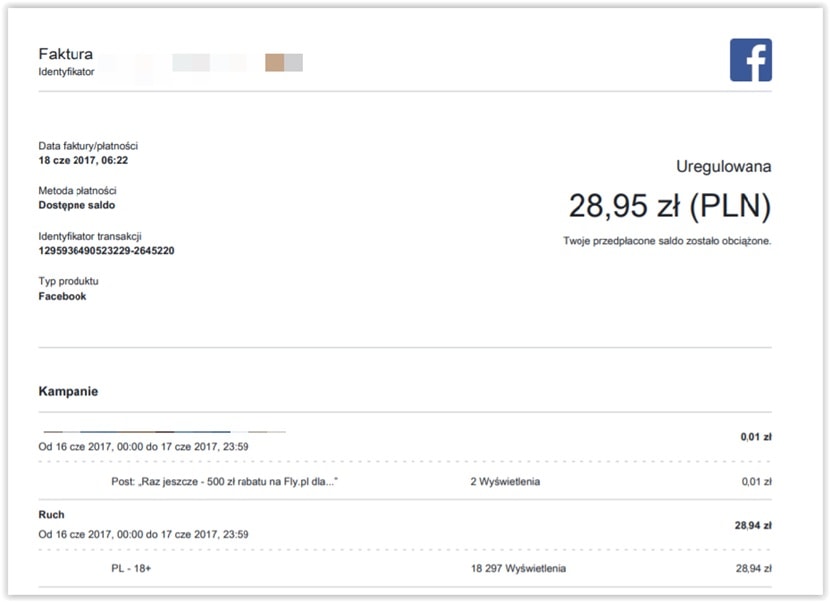
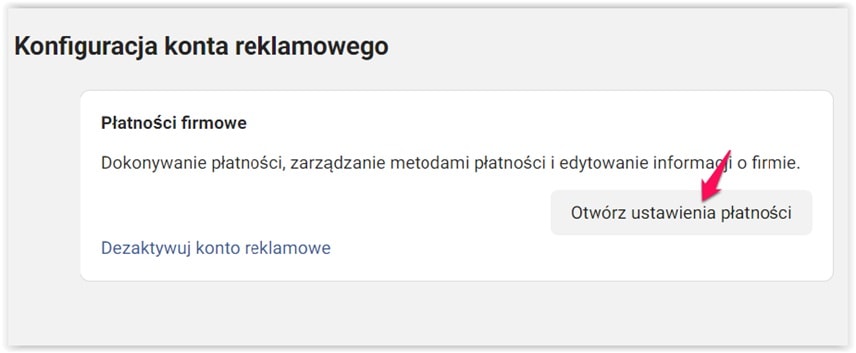
Why is that? It means you have to enter your company details — clearly you did not do it earlier. So they never made it onto the document. To be able to count what you spent as a business expense, change your account settings. Click the gear icon, then “Open payment settings.” That is where you enter the company's billing details.
Scroll down the page that opens to edit the “Business info” option.
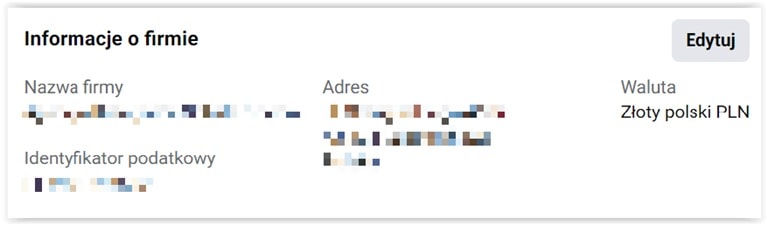
Enter the correct company details and save them. From then on the invoices will be issued properly. So now you know what a Facebook invoice looks like — but when does it become available to download?
When does Facebook issue invoices?
This social platform issues its accounting documents fully automatically, of course. But Facebook generates an invoice once you have spent a set amount on ads, or on a date it picks itself — so by default these will not be invoices covering “the 1st to the 31st,” but some other time frame. It is worth looking into the payment settings, checking the billing summary and adjusting some of it to suit you.
Putting Facebook invoices through your books
Since you used Facebook advertising to promote your business, you can add the document to your deductible business costs. Count the VAT invoice as a cost and you will pay less income tax. Is buying an advertising service like this easy to account for? Your accounting firm should of course be handling it, but if you do your own books, keep the rules for booking this document in mind.
Most often the document carries a Facebook address in Ireland. When you receive a document like that, for VAT purposes it counts as an import of services, and that is how it has to be settled.
Where the business owner is entitled to the VAT deduction, the transaction turns out to be tax-neutral — the output VAT and the input VAT come to the same amount, so in practice there is no need to transfer any VAT to the tax office on account of it.
A VAT invoice like this lowers the business owner's income tax — as long as they are taxed under Poland's progressive scale or the 19% flat tax. Remember that questions about accounting in a business, and not only there, are always worth talking through with an accountant. Bear in mind that the rules change.
We have years of experience running Facebook Ads campaigns. Drop us a line!
 Social mediaSocial LamaSocial media management – how do you manage your presence effectively?In the age of digital transformation, social media management has become a fundamental part of the marketing strategy of every company that wants to build a strong position in its market. Social media is a powerful communication tool for a brand that knows what it is doing: it lets you deliver information in the right form and at the right time for the audience, while raising brand awareness and building lasting relationships with customers. Social media marketing today demands more than an online presence. Above all it demands a strategic approach that accounts for business goals, the specifics of the target audience and the fast-moving trends in social media.READ POST
 Social mediaSocial LamaIs it worth starting from scratch? How the algorithm treats new and existing social media profilesWhen you set out to grow a brand on social media, you sometimes face this dilemma: build the community on the profile you already have, or start from scratch? Plenty of myths circulate about algorithms and what they prefer, but the truth is more complicated. The choice between a new account and an old one comes down to a few key factors that can decide whether you succeed or fail.READ POST
 Social mediaSocial LamaHow to post a trial reel on Instagram?Instagram keeps shipping new features that help creators and brands manage their content better. One of those tools is the trial reel, which reaches people outside your community first. The video goes to people who don't follow you – and if the test results look good, one tap shares the reel with your followers too.READ POST