How to work remotely and effectively?
#homeoffice tips that will make you more productive.

In this post
These days more and more people get the option of working remotely. Some think it's a great arrangement for them; others say it comes with disorganization. When we picture that kind of setup we often imagine warm slippers, coffee, working from bed, a series playing in the background and no boss looking over our shoulder. True, it sounds tempting – but are we productive then? Is that what remote work should look like? It isn't. What we should want is to prove to our manager that wherever we do our job, we do it well! And of course we have to remember not to fall into the remote-work trap and end up working late into the evening. So how do you work effectively?
1. Plan your day
When you know you'll be working remotely the next day, grab a sheet of paper or your laptop and map out exactly what that day is going to look like.
TASKS
Write down all the tasks you have to get done that day. Careful not to overdo it. Don't bite off more than you can chew. For building a task list we recommend the intuitive Trello, which will help you organize your work. Steadily “checking off” the tasks you've finished gives you a hit of endorphins and even more motivation!
WAKE-UP TIME
Think about what time you're getting out of bed. Don't treat remote work as a chance to catch up on sleep. Set yourself specific working hours and get on with it! That will help you avoid the trap we mentioned of working from morning to night.

2. Create the perfect space to work in
Lying in bed with a laptop on your knees is not a good idea. You take care to develop professionally and neglect your body? That can end badly!
A HEALTHY POSITION
What matters is finding a space at home where you feel comfortable. No, it shouldn't be the bed :). You need to get your sitting position right. What does that look like?
- Set your chair so that you sit upright, leaning back slightly.
- Keep your head in a relaxed position.
- Feet planted firmly on the floor. Remember not to cross your legs!
- Rest your forearms on the desk.
- Don't forget to sit right back in the chair.
What should it look like?
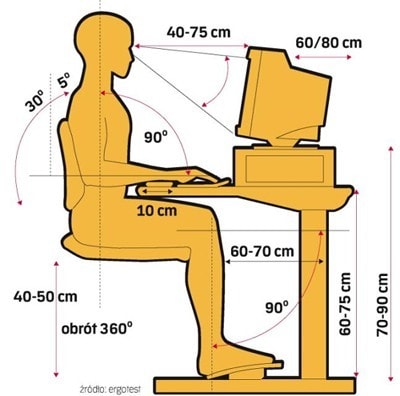
source: http://rehabilitacja-iris.pl/prawidlowa-i-ergonomiczna-pozycja-pracy-przy-komputerze
CARVE OUT A SPACE
Carve out a space for your work and make it your own! Maybe you'll put a plant or a photo of your dog on your desk or table? That part is up to you. What matters most is that you feel safe in that space and can focus on your tasks.

GET THE LIGHTING RIGHT
Working at a computer isn't good for your eyes to begin with, and if you work for hours in bad light your vision will get worse over time. Sort out good lighting and you'll save yourself and your eyes a lot of trouble!
3. Remember to take a break
Every one of us needs a break. It's a good idea to rest, loosen up, gather your thoughts. Working nonstop, with no break, doesn't help you do good, creative work. So schedule one for a specific hour and reset your brain! We guarantee it will run even better afterwards! If you work at a computer for at least 4 hours, don't forget the short breaks either. You should take a 5-minute rest every hour.

4. Turn off notifications on your phone
Make sure you don't get distracted. Turn off notifications on your phone. Every alert from a social platform only makes your work harder and derails it. Once you've replied to a message or checked a notification, it will be hard to get fully back into what you were doing.

5. Dress the part
The vision of working in a tracksuit or pajamas can be tempting, but we'd suggest dressing a little more like you're going out. Not an elegant dress or a suit, obviously, but it's worth putting on your favorite jeans, say. A tracksuit can make us lazy and leave us feeling off duty rather than fully switched on!
So… we wish you a productive stretch of remote work! 🙂
 MarketingSocial LamaInfluencer vs. UGC creator – what's the difference?In online marketing we keep running into the terms “influencer” and “UGC creator” (User-Generated Content). Both roles revolve around making content, but they differ in their goal, their scope, their relationship with brands and the way they reach an audience. Choosing between an influencer and a UGC creator comes down to a company's marketing strategy. What is an influencer? An influencer is someone who builds their own community on social media and, thanks to that recognition, influences what their followers decide to do.READ POST
 Marketing
 Łukasz PłocińskiCan your Instagram posts show up in Google results?Can your Instagram posts show up in Google results? Until recently that was rare, but the breakthrough has arrived. As of July 10, 2025, Instagram officially lets Google index public content from professional accounts (business and creator). That means photos, videos and Reels from those accounts can turn up in Google – alongside websites, blogs and YouTube videos.READ POST
 MarketingSocial LamaThe best Instagram hashtags to grow your reach on social mediaHashtags on Instagram are one of the most effective ways to grow your reach and get in front of new audiences without paying for ads. According to the latest research, posts with well-chosen hashtags can pull up to 70% more reach than posts with no tags at all. In a world where Instagram's algorithm keeps getting stricter, using hashtags well can be the key to a successful social media strategy.READ POST