How do you take an Instagram photo?
A few tips on building the perfect Instagram profile.
Instagram is a platform where the image rules. If you want to run marketing there, you have to make sure your photo holds its own against what ordinary users — and above all influencers — post every day. If you want real influence over your audience, your posts should be inspiring and should appeal to every artistic soul out there.
So we'd steer you away from photomontages, graphics and text laid over photos. The saying “a picture is worth a thousand words” absolutely holds on Instagram. Contrary to what you might think, you don't need to hire a professional studio or a photographer to take a good-looking “Instagram photo”. So what do you need?
- A phone with a good camera
- Good light (daylight, for example)
- A simple, free photo editing app
Here's what to look at first:

What's actually in the shot?
Why are you taking this particular photo? Probably because you like what you see and want to capture the moment. Focus for a second and check what's in the frame. There may be something in there that doesn't need to be, or you may be cutting off the thing or the person that's meant to be the main subject.
Is the place clean?
I pay particular attention to this when I'm shooting a product indoors in fairly tight close-up. Taking a photo against a wall that's dirty? It doesn't look great — pick a different stretch of wall or retouch the marks in an editor. There's nothing wrong with a light fix to that kind of detail. Dust settled on a piece of furniture, a mirror, a picture frame? Wipe it down and you'll save yourself the edits later.
Let there be light!
Indoors, in weak lighting, even the newest iPhone can't save you! Make sure the room is lit with natural light, or with artificial light that is white (not yellow-orange!). You'll gain in quality and cut down the work at the editing stage.
Filter your filters
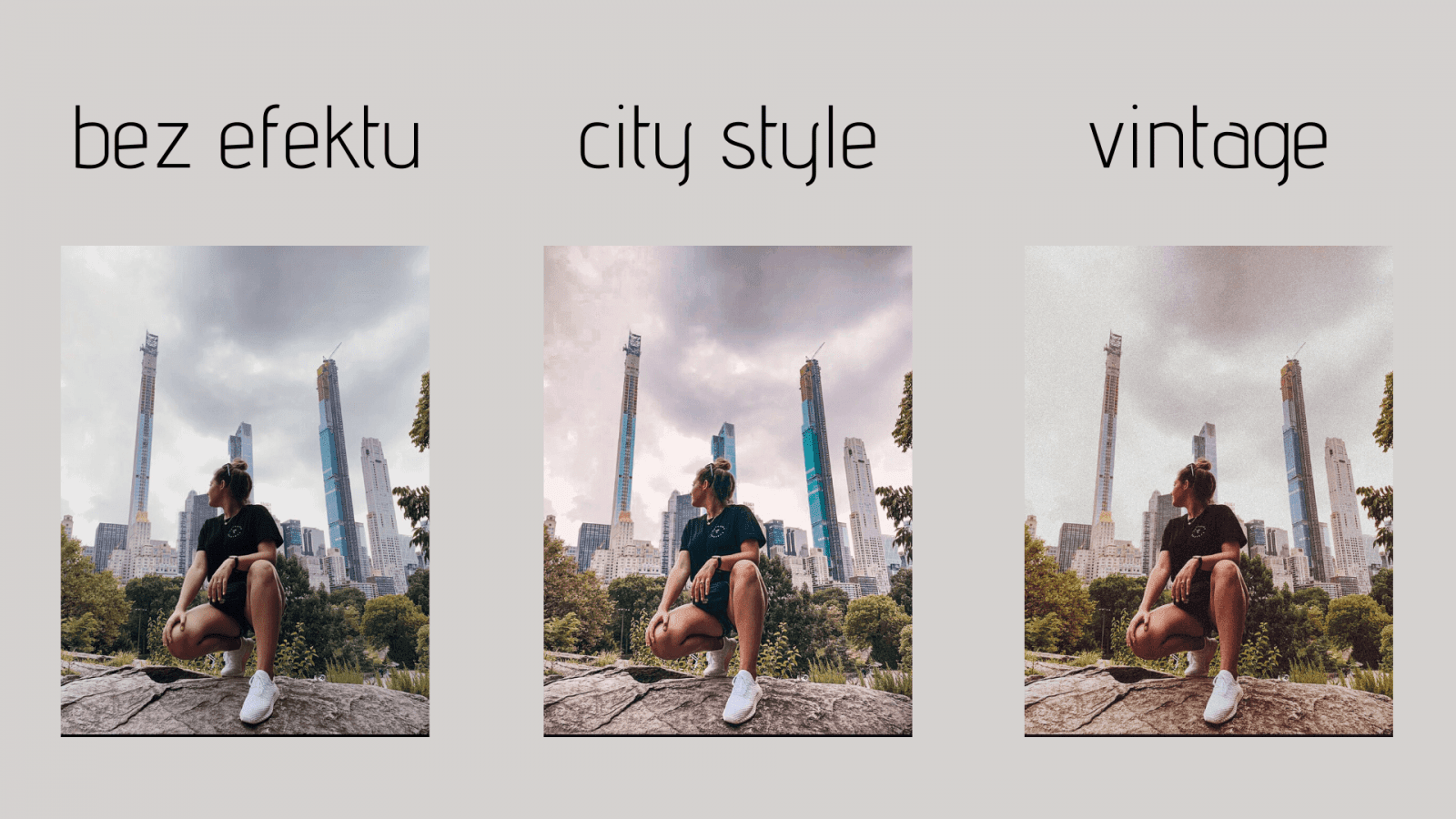
Editing is what gives a photo its character. The same shot can be romantic or new-school, dramatic or like it came off a film camera from your grandmother's wardrobe. Worth remembering, though: when you're running a profile, settle on a consistent look and apply a similar effect to all your photos. That's what makes a profile look professional and the photos you post look deliberate.
Know Lightroom? It's a free app (in the smartphone version) that gives you plenty of room to edit. It took me a while myself to get my head around everything it does, but it was worth it.
You can also build so-called presets, saved photo settings gathered into a single filter. Once you've applied one, nudge the values slightly to fit the individual photo. That's how you get a consistent Instagram grid off one chosen preset. You can buy presets from people with more skill in the program. Personally I use a few free ones I found online, or rework them myself as I see fit. For anyone less advanced there's also VSCO, which I was still using regularly last year. Two more of the better apps are Photoshop Express and Facetune, which even in the free version give you a lot to work with when retouching.

Beyond these four apps you'll find masses of others worth testing, so you can pick the one that suits your own preferences.
Below are examples of photos edited in different styles:




Taking a good photo, or planning a feed for a brand, takes more time than it might seem at first. Sometimes we miss the small details, and the small details are where the whole thing hinges. Practice makes perfect, so pick up your phone and start shooting your first insta-shots. Look for your own style and your own take on the product, and in a while you'll definitely see progress.
Bear in mind, though, that photography takes a certain knack. If you've tried repeatedly and you're still not happy with your results, come to us. You can book training, a consultation or a product shoot. We'll help you get the results you're after.
 Social mediaSocial LamaSocial media management – how do you manage your presence effectively?In the age of digital transformation, social media management has become a fundamental part of the marketing strategy of every company that wants to build a strong position in its market. Social media is a powerful communication tool for a brand that knows what it is doing: it lets you deliver information in the right form and at the right time for the audience, while raising brand awareness and building lasting relationships with customers. Social media marketing today demands more than an online presence. Above all it demands a strategic approach that accounts for business goals, the specifics of the target audience and the fast-moving trends in social media.READ POST
 Social mediaSocial LamaIs it worth starting from scratch? How the algorithm treats new and existing social media profilesWhen you set out to grow a brand on social media, you sometimes face this dilemma: build the community on the profile you already have, or start from scratch? Plenty of myths circulate about algorithms and what they prefer, but the truth is more complicated. The choice between a new account and an old one comes down to a few key factors that can decide whether you succeed or fail.READ POST
 Social mediaSocial LamaHow to post a trial reel on Instagram?Instagram keeps shipping new features that help creators and brands manage their content better. One of those tools is the trial reel, which reaches people outside your community first. The video goes to people who don't follow you – and if the test results look good, one tap shares the reel with your followers too.READ POST