How do you contact Facebook support?
Every social media specialist runs into technical problems at work. They happen on Facebook too — on Pages, in Business Managers and on ad accounts alike. How do you reach the platform's support to get a problem solved? Talking to our clients, we're often asked whether it's possible to email the platform or call a hotline to speak to an agent.

Talking to our clients, we're often asked whether it's possible to email the platform or call a hotline to speak to an agent. Unfortunately, Facebook offers neither.
The options for contacting support sit inside the platform itself, and there are two routes to choose from: opening a live chat or using the form available on the site. Each of them comes with its own quirks, which we'll go through below.
Contacting Facebook by live chat
Live chat is a way of reaching support that is available only to advertisers. That means if you've never run a paid campaign on your social media, this option won't be open to you.
Live chat is the most convenient way to reach support when what matters is having your case picked up quickly on Facebook's side — an agent usually gets in touch within a few minutes.
How do you reach support by live chat?
- Open this link: https://www.facebook.com/business/help and click the Get Started button at the bottom of the page:

2. Choose the account your problem relates to:

3. Choose the type of problem. If you can't find the topic your case is about on the list, you can pick any option:
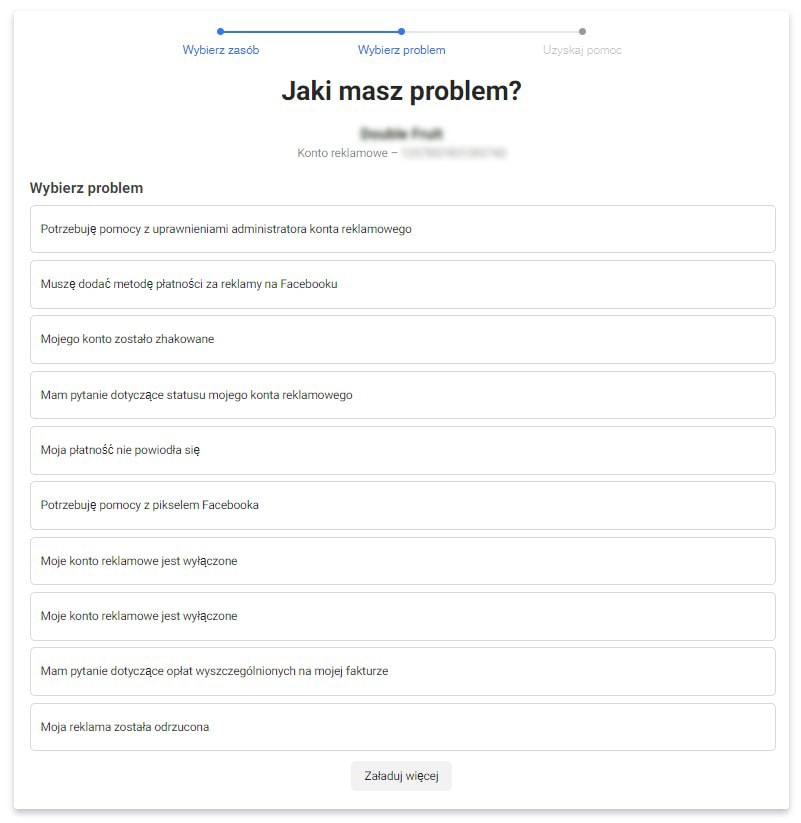
4. At this point Facebook will suggest a ready-made solution. If the tip turns out not to be enough, click Contact Support Team at the bottom of the page:

A window will appear in which you should describe your problem briefly:

5. The platform will redirect you to the Messenger app, where a Facebook agent will open a chat. If the problem concerns an ad account, have its ID ready — the agent will ask you for it.

Depending on the kind of case, your problem may be solved on the spot, or you may have to wait for extra help from the technical team — in which case the wait stretches to a few days.
PROTIP I: On more complicated cases you can ask the agent to call you — some technical details are easier to explain over the phone. We're noticing that agents are increasingly happy to take that route. Before the call you'll be asked to consent to it being recorded.
PROTIP II: We recommend always asking the agent for an emailed summary of the case. That way, if other difficulties come up along the way and keep your problem from being solved, you can point back by email to the solutions you were offered.
Worth adding that live chat is available during standard office hours — if we want to reach support late in the evening, we'll find the option to leave a message, and the reply from the support team arrives by email within 48 hours.
From experience we know that not every advertiser can reach Facebook support by live chat straight away — new advertisers on Ads Manager have to wait for the option to unlock after running a handful (or a dozen-odd) ad campaigns.
Contacting Facebook by form
If you've never run ads and the live chat option isn't available to you, what's left is contacting support through the standard form.
- Once you're logged in to Facebook, click the little triangle at the top of the page (the far-right button) and, when the menu opens, choose Help & Support:


2. Choose Report a Problem, then Something Went Wrong:

3. Fill in the form and click Send:

With this way of reaching Facebook support you'll need patience — agents answer cases in the order they come in.
If you need help with your Page, your ad account or your Business Manager — get in touch with us. We'll gladly help, or contact support by live chat on your behalf.
 Social mediaSocial LamaSocial media management – how do you manage your presence effectively?In the age of digital transformation, social media management has become a fundamental part of the marketing strategy of every company that wants to build a strong position in its market. Social media is a powerful communication tool for a brand that knows what it is doing: it lets you deliver information in the right form and at the right time for the audience, while raising brand awareness and building lasting relationships with customers. Social media marketing today demands more than an online presence. Above all it demands a strategic approach that accounts for business goals, the specifics of the target audience and the fast-moving trends in social media.READ POST
 Social mediaSocial LamaIs it worth starting from scratch? How the algorithm treats new and existing social media profilesWhen you set out to grow a brand on social media, you sometimes face this dilemma: build the community on the profile you already have, or start from scratch? Plenty of myths circulate about algorithms and what they prefer, but the truth is more complicated. The choice between a new account and an old one comes down to a few key factors that can decide whether you succeed or fail.READ POST
 Social mediaSocial LamaHow to post a trial reel on Instagram?Instagram keeps shipping new features that help creators and brands manage their content better. One of those tools is the trial reel, which reaches people outside your community first. The video goes to people who don't follow you – and if the test results look good, one tap shares the reel with your followers too.READ POST