Twitter – a guide to communicating and promoting your brand on the platform
Is there any point in communicating on Twitter?

Want your brand to make a name for itself online? Great! The first thing you think of is being on Google and Facebook. True enough, those matter a great deal and they'll get you in front of your target audience, but it's worth thinking about other platforms too. One of the most underrated in Poland is Twitter, and Twitter is what we're looking at today.
Why be there at all? Is it a medium for everyone? How do you communicate and, above all, promote?
Communication
Twitter, unlike Facebook, is built first and foremost on dialogue. It's a public platform where the short messages users send aren't limited to friends but available to everyone – you can find them by particular keywords or handles through a clear search. That means a brand can jump into a conversation on a given topic quickly, or hunt down questions about its industry, services or products and answer those too. It's certainly a bigger challenge for marketers than moderating the one-way communication on Facebook, where all you do is reply to the comments and messages that land on the company fan page, but it's worth every bit of it.
The Poles who are on Twitter are a little different from the Facebook crowd – there are fewer of them, but they're valuable customers: they're happy to shop online, often on impulse, they file complaints less often, and they like gadgets and new tech. They have a sense of humor too, but above all they expect information that's worth something. So how do you communicate on Twitter?
- Mix up your content – post links as well as photos, GIFs, polls and text-only tweets, plus retweets. The important thing is that they're closely tied to your industry.
- React – Twitter is a superb real-time marketing tool, as long as you're not only tweeting but also keeping an eye on what your competitors and your target audience are doing, and reacting to anything worth reacting to (retweeting, commenting).
- Use the popular hashtags in the “Trends” tab – it makes you more visible on the platform.
- Post regularly – unlike on Facebook, “spam” isn't a concept on Twitter, and users tweet a dozen or more(!) times a day. So one tweet a day is definitely not overdoing it 😉
- Create moments – the “Moments” feature lets you pull a group of tweets together into a single whole that tells a particular story or hangs together as one piece. You can build a Moment out of new tweets or ones you posted earlier.
- Go live – every social platform is betting on video right now, and video plus real-time marketing is exactly what livestreaming is: the perfect recipe for success.
- Advertise – Twitter gives you plenty of ways to target precisely and pick your campaign objective, and I'll cover that in more detail later in this guide.
- If you run a group of brands or a separate profile for each product, you can build a list of profiles. Nestle, for example, could make a list of its brands like KitKat, Gerber or Nesquik. Here's a list of Polish companies on Twitter, put together by the Polish marketing portal Socjomania: https://twitter.com/Socjomania/lists/marki-na-twitterze-pl
Advertising
Even when a brand does commit to a Twitter account, it very often just recycles content from other platforms. You can do that, but only occasionally, when a piece of content is genuinely important. Social platforms differ from one another in what they're for and who's on them, so the messages should differ too. But it isn't presence, or individually written content, that brands reach for least on this platform – it's advertising. Perhaps the reason is that being able to switch ads on and optimize them by hand arrived relatively recently compared with Facebook (before that, Poland had a single agency dedicated to it – 140 Media). Now, though, you can launch an ad yourself without any trouble and, importantly, target it in a completely different way from Facebook despite the similar objectives. Let's start with those objectives:

- App installs – as the name suggests, this ad is meant to increase the number of installs of your app. Handily, if it turns out users downloaded the app but aren't using it, you can encourage them to open it with the “app re-engagement” objective. That ad works as remarketing.
- Followers – this works much like Page likes on Facebook, except it's worth more, because Twitter, unlike FB, isn't cutting organic reach yet. So by promoting the profile itself and collecting followers, you increase both reach and engagement under your tweets (assuming, of course, that they're any good).
- Promoting posts, video or GIFs – works much like boosting posts on Facebook: it shows up in a user's timeline even if they don't follow the profile, so you can engage people who don't know the brand at all.
- Clicks and conversions – this objective lets you promote a tweet that sends people to your site. It's a strictly sales-focused objective that lets you track not just clicks but purchase behavior, without installing a pixel the way you have to on Facebook.
- Brand awareness – maximizes the reach of your tweet and, with it, of your company.
Once you've picked the objective that actually matters to you, you move on to budget, and then to targeting. We'll show targeting using a promoted tweet as the example.
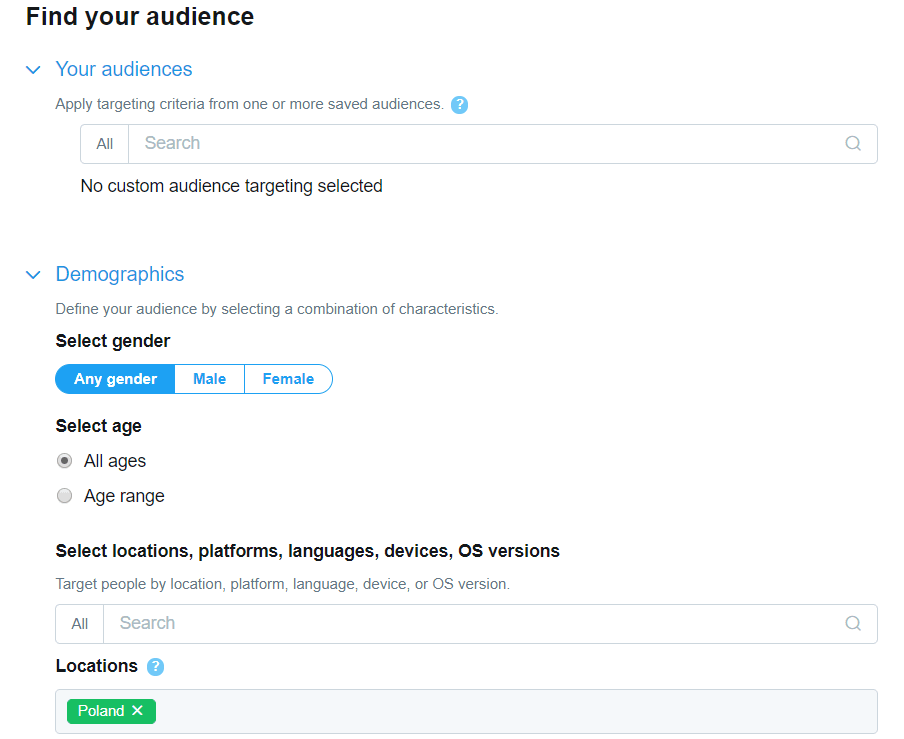
Interestingly, beyond the standard demographic options like age, gender, location or interests, there are considerably more advanced ones.

Events, among other things, let you target very precisely. Twitter suggests a schedule of what's coming up – pick the one your tweet is about and the odds are overwhelming that you'll engage the crowd who care about it. That's a huge shot at a fun, real-time-marketing viral hit.
The targeting options also include things like the hashtags a person uses (or doesn't use, since there's an option for excluding keywords) and the profiles a person follows. Which makes reaching your competitors' fans very easy indeed.
The clicks campaign is different from Facebook's too. Before we get to targeting, we have to pick the category that best describes not the user but our domain! That's how Twitter matches the users who might be interested in the site.
As for where the ad appears, you can choose not just a user's timeline but even profiles, the pages of specific events, or search results.

Selling pizza? Show up among the tweets about the local match, when the fans want to talk about their favorite players' game at half time. Think they won't bite? 😉
And you – will you bite? If you'd like to start communicating or promote your products using Twitter, come talk to us! 😉
 Social mediaSocial LamaSocial media management – how do you manage your presence effectively?In the age of digital transformation, social media management has become a fundamental part of the marketing strategy of every company that wants to build a strong position in its market. Social media is a powerful communication tool for a brand that knows what it is doing: it lets you deliver information in the right form and at the right time for the audience, while raising brand awareness and building lasting relationships with customers. Social media marketing today demands more than an online presence. Above all it demands a strategic approach that accounts for business goals, the specifics of the target audience and the fast-moving trends in social media.READ POST
 Social mediaSocial LamaIs it worth starting from scratch? How the algorithm treats new and existing social media profilesWhen you set out to grow a brand on social media, you sometimes face this dilemma: build the community on the profile you already have, or start from scratch? Plenty of myths circulate about algorithms and what they prefer, but the truth is more complicated. The choice between a new account and an old one comes down to a few key factors that can decide whether you succeed or fail.READ POST
 Social mediaSocial LamaHow to post a trial reel on Instagram?Instagram keeps shipping new features that help creators and brands manage their content better. One of those tools is the trial reel, which reaches people outside your community first. The video goes to people who don't follow you – and if the test results look good, one tap shares the reel with your followers too.READ POST